


I would like to add my small contribution for the management of a server FiveM under linux. I know there are already several topics, but I find some are incomplete or not practical uses, that’s why I created my own script.
Nothing complicated to use it.
You will need :
Server Linux
Server FiveM
A mouse
A keyboard
Putty (or other)
You need ton install screen on your debian distrib’ : sudo apt install screen / sudo yum install screen
What does this script do?
It allows to start, restart, stop, screen, and check the status of its server FiveM. But not only!
It also restart mysql, clear the server cache and restart sessionmanager.
Putty
I will not show you how to use putty, it’s way too simple.
Open putty and connect to your linux server.
Once connected, navigate to your FiveM directory via the command cd
Once you are at the root of your server, use the wget command
wget https://raw.githubusercontent.com/HalCr ... /manage.sh
Technically, you should have a file named manage.sh at the root of your directory
Now, edit this files. Two solutions, via the editor (vim/nano…), or via your ftp if you are a slacker. I will use nano.
Edit the manage.sh vith the command nano manage.sh. You go into edit mode
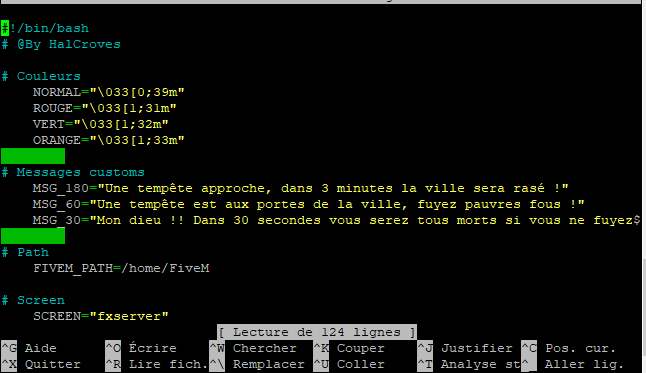
Arrived at this stage, You only have to modify a few lines.
The messages that will be displayed in the chat when restarting
MSG_180 = message send 3 minutes before restarting server
MSG_60 = message send 1 minute before restarting server
MSG_30 = message send 30 seconds before restarting server
The folder where your server is located (root). Edit the variable FIVEM_PATH
8.Once modified, you just have to do CTRL + X, type O and press ENTER
Use script
/!\ At the first use, the fivem server must be completely off, because here I use as the name of screen fxserver
To use this script, you must be at the root of your fivem server (ex: /home/FiveM).
I advise you to use the dos2unix command (apt-get install dos2unix) to convert your file to the correct format.
Like this :
dos2unix manage.sh
And you need to add permissions on this file :
chmod -R 755 manage.sh
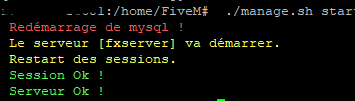
Now, we simply use the command ./manage.sh start
This will start the server.
Other uses
./manage.sh start : start server
./manage.sh stop : stop server
./manage.sh restart : restart server
./manage.sh screen : connect to the screen (console)
./manage.sh status : lets you know if the fivem server is started or not
Add a cron task
If you want to use this script for an automatic reboot at any time, you must create a cron task.
For this, i use crontab -e. You need to defile the file editor with your arrow keys.
Exemple :
Here the server will reboot at 00:00, 12pm, 18pm.
00 00 * * * /home/FiveM/manage.sh restart
0 12 * * * /home/FiveM/manage.sh restart
0 18 * * * /home/FiveM/manage.sh restart
Once modified, you just have to do CTRL + X, type O and press ENTER

 GAZDUIRE JOCURI / VPS / GAZDUIRE WEB / SERVERE DEDICATE - Stock NELIMITAT / Valabil comandati pe


